<?xml version="1.0" encoding="utf-8"?>
<feed xmlns="http://www.w3.org/2005/Atom" xmlns:content="http://purl.org/rss/1.0/modules/content/"><link href="https://franciscomadeira.com"/><link href="https://franciscomadeira.com/feed" rel="self" type="application/rss+xml"/><author><name>Francisco Madeira</name></author><title>Francisco Madeira Blog</title><id>https://franciscomadeira.com</id><updated>2026-04-26T12:51:12+00:00</updated><entry><link href="https://franciscomadeira.com/laravel-pint-workflow" rel="alternate"/><content type="html">&lt;p&gt;When using Laravel Pint to work as a coding standard, we should have an workflow that runs the coding styling for us.&lt;/p&gt;
&lt;h2&gt;Workflow Yml Code&lt;/h2&gt;
&lt;p&gt;Go to your base code and add an workflow with the following code:&lt;/p&gt;
&lt;pre&gt;&lt;code class="language-yml"&gt;name: Run style format (PHP)

on: [push]

jobs:
    run-style:
        name: Run style format (PHP)
        runs-on: ubuntu-latest
        steps:
            -   uses: actions/checkout@v2

            -   name: Setup PHP
                uses: shivammathur/setup-php@v2
                with:
                    php-version: '8.2'
                    extensions: dom, curl, libxml, mbstring, zip, pcntl, pdo, sqlite, pdo_sqlite, bcmath, soap, intl, gd, exif, iconv, imagick
                    coverage: none

            -   name: Run composer install
                run: composer install -n --prefer-dist
                env:
                    COMPOSER_AUTH: ${{ secrets.COMPOSER_AUTH }}

            -   name: Run style format
                run: ./vendor/bin/pint --test -v --ansi
&lt;/code&gt;&lt;/pre&gt;
&lt;p&gt;With that, on every commit, or PR it will give you a result that will follow the Laravel coding standard.&lt;/p&gt;
&lt;p&gt;You can find more information on &lt;a href="https://github.com/laravel/pint"&gt;GitHub&lt;/a&gt;, and make sure to give it a ⭐️ star!&lt;/p&gt;
<![CDATA[<p>When using Laravel Pint to work as a coding standard, we should have an workflow that runs the coding styling for us.</p>
<h2>Workflow Yml Code</h2>
<p>Go to your base code and add an workflow with the following code:</p>
<pre><code class="language-yml">name: Run style format (PHP)

on: [push]

jobs:
    run-style:
        name: Run style format (PHP)
        runs-on: ubuntu-latest
        steps:
            -   uses: actions/checkout@v2

            -   name: Setup PHP
                uses: shivammathur/setup-php@v2
                with:
                    php-version: '8.2'
                    extensions: dom, curl, libxml, mbstring, zip, pcntl, pdo, sqlite, pdo_sqlite, bcmath, soap, intl, gd, exif, iconv, imagick
                    coverage: none

            -   name: Run composer install
                run: composer install -n --prefer-dist
                env:
                    COMPOSER_AUTH: ${{ secrets.COMPOSER_AUTH }}

            -   name: Run style format
                run: ./vendor/bin/pint --test -v --ansi
</code></pre>
<p>With that, on every commit, or PR it will give you a result that will follow the Laravel coding standard.</p>
<p>You can find more information on <a href="https://github.com/laravel/pint">GitHub</a>, and make sure to give it a ⭐️ star!</p>
]]></content><title>Laravel Pint GitHub Workflow</title><summary>When using Laravel Pint to work as a coding standard, we should have an workflow that runs the coding styling for us.</summary><updated>2023-01-05T02:38:18+00:00</updated><id>https://franciscomadeira.com/laravel-pint-workflow</id></entry><entry><link href="https://franciscomadeira.com/how-to-use-laravel-vue-i18n" rel="alternate"/><content type="html">&lt;p&gt;The goal of this package is to have the closest experience that is available with the Laravel Localization but for the frontend side.&lt;/p&gt;
&lt;blockquote&gt;
&lt;p&gt;If you prefer a video screencast you can check out this:&lt;/p&gt;
&lt;/blockquote&gt;
&lt;iframe width="560" height="315" src="https://www.youtube.com/embed/ONRo8-i5Qsk" title="YouTube video player" frameborder="0" allow="accelerometer; autoplay; clipboard-write; encrypted-media; gyroscope; picture-in-picture" allowfullscreen&gt;&lt;/iframe&gt;
&lt;h2&gt;Install Laravel&lt;/h2&gt;
&lt;p&gt;Lets install a brand new &lt;strong&gt;Laravel&lt;/strong&gt; project with &lt;a href="https://github.com/laravel/jetstream"&gt;Jetstream&lt;/a&gt;, to have some Laravel with Vue3 Inertia Scaffolding.&lt;/p&gt;
&lt;p&gt;Go to you code directory and run:&lt;/p&gt;
&lt;pre&gt;&lt;code class="language-sh"&gt;laravel new app
cd app
composer require laravel/jetstream
php artisan jetstream:install inertia
npm install
&lt;/code&gt;&lt;/pre&gt;
&lt;p&gt;With all of that installed, lets run the migrations (make sure to update the &lt;code&gt;.env&lt;/code&gt; file with the correct database settings):&lt;/p&gt;
&lt;pre&gt;&lt;code class="language-sh"&gt;php artisan migrate
&lt;/code&gt;&lt;/pre&gt;
&lt;h2&gt;Usage&lt;/h2&gt;
&lt;p&gt;With all the Laravel instalation process complete, go ahead and install the plugin:&lt;/p&gt;
&lt;pre&gt;&lt;code class="language-sh"&gt;npm install laravel-vue-i18n
&lt;/code&gt;&lt;/pre&gt;
&lt;p&gt;Now open the &lt;code&gt;resources/js/app.js&lt;/code&gt; file and import &lt;code&gt;laravel-vue-i18n&lt;/code&gt;:&lt;/p&gt;
&lt;pre&gt;&lt;code class="language-js"&gt;import { i18nVue } from 'laravel-vue-i18n'
&lt;/code&gt;&lt;/pre&gt;
&lt;p&gt;Bellow, inside the &lt;code&gt;setup&lt;/code&gt; method you can now apply the plugin to the Vue instance:&lt;/p&gt;
&lt;pre&gt;&lt;code class="language-js"&gt;createInertiaApp({
    title: (title) =&gt; `${title} - ${appName}`,
    resolve: (name) =&gt; require(`./Pages/${name}.vue`),
    setup({ el, app, props, plugin }) {
        return createApp({ render: () =&gt; h(app, props) })
            .use(plugin)
            .use(i18nVue, { 
                resolve: (lang) =&gt; import(`../../lang/${lang}.json`) 
            })
            .mixin({ methods: { route } })
            .mount(el);
    },
});
&lt;/code&gt;&lt;/pre&gt;
&lt;p&gt;With all of that done, now you can use the plugin with the &lt;code&gt;$t()&lt;/code&gt; mixin.&lt;/p&gt;
&lt;p&gt;To try it out, open the &lt;code&gt;resources/js/Pages/Welcome.vue&lt;/code&gt; and use the mixin:&lt;/p&gt;
&lt;pre&gt;&lt;code class="language-js"&gt;&lt;template&gt;
    ...
    &lt;div class="mt-8 text-2xl"&gt;
        {{ $t('Welcome to your Jetstream application!') }}
    &lt;/div&gt;
    ...
&lt;/template&gt;
&lt;/code&gt;&lt;/pre&gt;
&lt;p&gt;then, you can open the &lt;code&gt;lang/en.json&lt;/code&gt; file and add a new translation for that sentence:&lt;/p&gt;
&lt;pre&gt;&lt;code class="language-json"&gt;{
    "Welcome to your Jetstream application!": "Welcome to your Translated Jetstream application!"
}
&lt;/code&gt;&lt;/pre&gt;
&lt;p&gt;And its &lt;strong&gt;done&lt;/strong&gt;! If you reload the page you should see the translated sentence in there.&lt;/p&gt;
&lt;h2&gt;How to use &lt;code&gt;.php&lt;/code&gt; translation files&lt;/h2&gt;
&lt;p&gt;Now if you want to go a step further and also have the &lt;code&gt;.php&lt;/code&gt; translation files available on frontend, not possible out of the box since the browser can't open the &lt;code&gt;.php&lt;/code&gt; files, for that you can we can use the mix plugin provided by the plugin.&lt;/p&gt;
&lt;p&gt;To set it up, open the &lt;code&gt;webpack.mix.js&lt;/code&gt; and require the mix plugin:&lt;/p&gt;
&lt;pre&gt;&lt;code class="language-js"&gt;const mix = require('laravel-mix');
require('laravel-vue-i18n/mix');
&lt;/code&gt;&lt;/pre&gt;
&lt;p&gt;and just include the plugin, under the mix chain:&lt;/p&gt;
&lt;pre&gt;&lt;code class="language-js"&gt;mix.js('resources/js/app.js', 'public/js').vue()
   .i18n()
   ...
&lt;/code&gt;&lt;/pre&gt;
&lt;p&gt;With this done, you can start using the &lt;code&gt;.php&lt;/code&gt; translation files on your &lt;code&gt;.vue&lt;/code&gt; files like this:&lt;/p&gt;
&lt;pre&gt;&lt;code class="language-js"&gt;&lt;template&gt;
    ...
    &lt;div&gt;
        {{ $t('auth.failed') }}
    &lt;/div&gt;
    ...
&lt;/template&gt;
&lt;/code&gt;&lt;/pre&gt;
&lt;p&gt;And thats all you need to have the plugin working with both &lt;code&gt;.json&lt;/code&gt; and &lt;code&gt;.php&lt;/code&gt; translations!&lt;/p&gt;
&lt;p&gt;You can find more information on &lt;a href="https://github.com/xiCO2k/laravel-vue-i18n"&gt;GitHub&lt;/a&gt;, and make sure to give it a ⭐️ star!&lt;/p&gt;
<![CDATA[<p>The goal of this package is to have the closest experience that is available with the Laravel Localization but for the frontend side.</p>
<blockquote>
<p>If you prefer a video screencast you can check out this:</p>
</blockquote>
&lt;iframe width="560" height="315" src="https://www.youtube.com/embed/ONRo8-i5Qsk" title="YouTube video player" frameborder="0" allow="accelerometer; autoplay; clipboard-write; encrypted-media; gyroscope; picture-in-picture" allowfullscreen>&lt;/iframe>
<h2>Install Laravel</h2>
<p>Lets install a brand new <strong>Laravel</strong> project with <a href="https://github.com/laravel/jetstream">Jetstream</a>, to have some Laravel with Vue3 Inertia Scaffolding.</p>
<p>Go to you code directory and run:</p>
<pre><code class="language-sh">laravel new app
cd app
composer require laravel/jetstream
php artisan jetstream:install inertia
npm install
</code></pre>
<p>With all of that installed, lets run the migrations (make sure to update the <code>.env</code> file with the correct database settings):</p>
<pre><code class="language-sh">php artisan migrate
</code></pre>
<h2>Usage</h2>
<p>With all the Laravel instalation process complete, go ahead and install the plugin:</p>
<pre><code class="language-sh">npm install laravel-vue-i18n
</code></pre>
<p>Now open the <code>resources/js/app.js</code> file and import <code>laravel-vue-i18n</code>:</p>
<pre><code class="language-js">import { i18nVue } from 'laravel-vue-i18n'
</code></pre>
<p>Bellow, inside the <code>setup</code> method you can now apply the plugin to the Vue instance:</p>
<pre><code class="language-js">createInertiaApp({
    title: (title) =&gt; `${title} - ${appName}`,
    resolve: (name) =&gt; require(`./Pages/${name}.vue`),
    setup({ el, app, props, plugin }) {
        return createApp({ render: () =&gt; h(app, props) })
            .use(plugin)
            .use(i18nVue, { 
                resolve: (lang) =&gt; import(`../../lang/${lang}.json`) 
            })
            .mixin({ methods: { route } })
            .mount(el);
    },
});
</code></pre>
<p>With all of that done, now you can use the plugin with the <code>$t()</code> mixin.</p>
<p>To try it out, open the <code>resources/js/Pages/Welcome.vue</code> and use the mixin:</p>
<pre><code class="language-js">&lt;template&gt;
    ...
    &lt;div class=&quot;mt-8 text-2xl&quot;&gt;
        {{ $t('Welcome to your Jetstream application!') }}
    &lt;/div&gt;
    ...
&lt;/template&gt;
</code></pre>
<p>then, you can open the <code>lang/en.json</code> file and add a new translation for that sentence:</p>
<pre><code class="language-json">{
    &quot;Welcome to your Jetstream application!&quot;: &quot;Welcome to your Translated Jetstream application!&quot;
}
</code></pre>
<p>And its <strong>done</strong>! If you reload the page you should see the translated sentence in there.</p>
<h2>How to use <code>.php</code> translation files</h2>
<p>Now if you want to go a step further and also have the <code>.php</code> translation files available on frontend, not possible out of the box since the browser can't open the <code>.php</code> files, for that you can we can use the mix plugin provided by the plugin.</p>
<p>To set it up, open the <code>webpack.mix.js</code> and require the mix plugin:</p>
<pre><code class="language-js">const mix = require('laravel-mix');
require('laravel-vue-i18n/mix');
</code></pre>
<p>and just include the plugin, under the mix chain:</p>
<pre><code class="language-js">mix.js('resources/js/app.js', 'public/js').vue()
   .i18n()
   ...
</code></pre>
<p>With this done, you can start using the <code>.php</code> translation files on your <code>.vue</code> files like this:</p>
<pre><code class="language-js">&lt;template&gt;
    ...
    &lt;div&gt;
        {{ $t('auth.failed') }}
    &lt;/div&gt;
    ...
&lt;/template&gt;
</code></pre>
<p>And thats all you need to have the plugin working with both <code>.json</code> and <code>.php</code> translations!</p>
<p>You can find more information on <a href="https://github.com/xiCO2k/laravel-vue-i18n">GitHub</a>, and make sure to give it a ⭐️ star!</p>
]]></content><title>How to use Laravel Vue i18n</title><summary>The goal of this package is to have the closest experience that is available with the Laravel Localization but for the frontend side.</summary><updated>2022-03-30T18:36:09+00:00</updated><id>https://franciscomadeira.com/how-to-use-laravel-vue-i18n</id></entry><entry><link href="https://franciscomadeira.com/termwind-released" rel="alternate"/><content type="html">&lt;p&gt;&lt;img src="https://franciscomadeira.com/images/termwind-released-hero.webp" alt="Termwind Released!" /&gt; &lt;/p&gt;
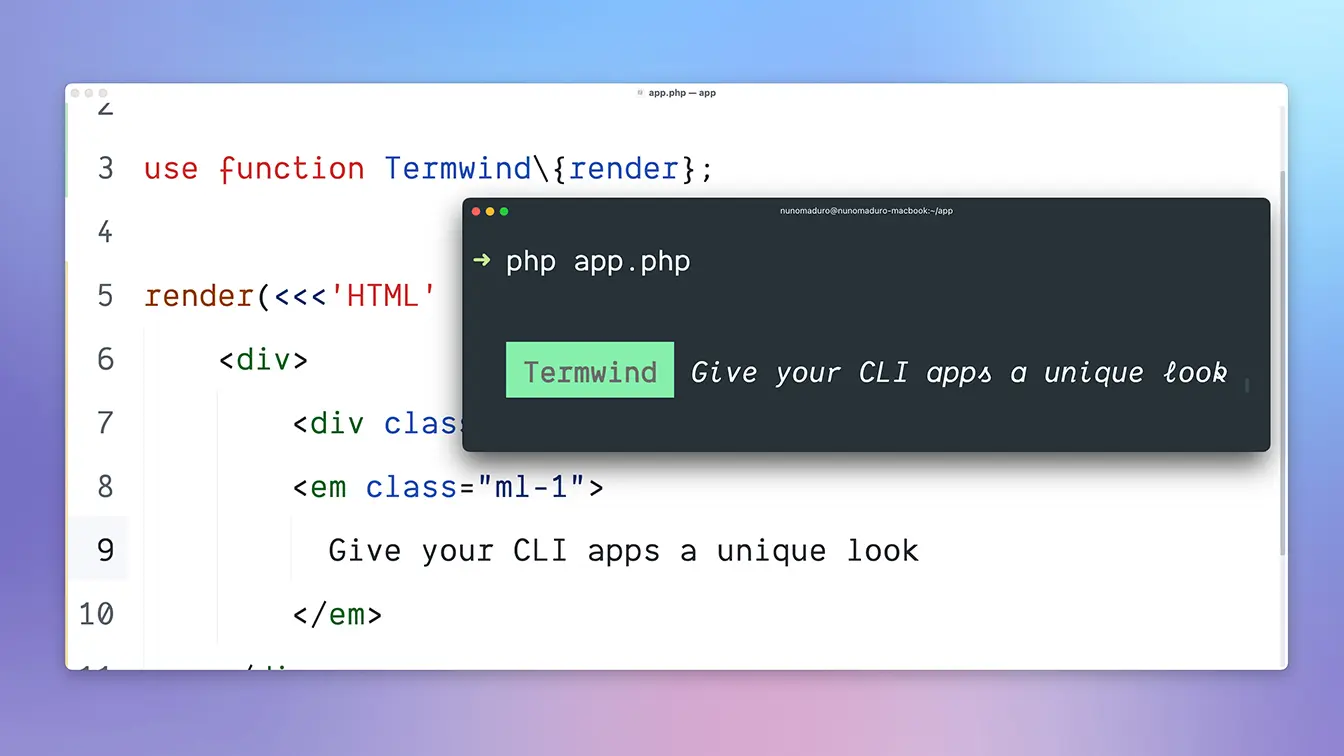
&lt;p&gt;Termwind allows you to build unique and beautiful PHP command-line applications, using the Tailwind CSS API with an HTML Renderer. In short, it's like Tailwind CSS, but for the PHP command-line applications.&lt;/p&gt;
&lt;p&gt;Termwind was created by &lt;a href="https://twitter.com/xiCO2k"&gt;Francisco Madeira&lt;/a&gt; and &lt;a href="https://twitter.com/enunomaduro"&gt;Nuno Maduro&lt;/a&gt;, and after almost three months of development &lt;strong&gt;Termwind v1.0 is available&lt;/strong&gt;, and you can start using on your projects.&lt;/p&gt;
&lt;p&gt;Checkout the repository on &lt;a href="https://github.com/nunomaduro/termwind"&gt;GitHub&lt;/a&gt;!&lt;/p&gt;
&lt;h2&gt;Why?&lt;/h2&gt;
&lt;p&gt;One of many things that annoyed all the CLI developers was to add some margin before the content, just to have some breathing room, without &lt;strong&gt;Termwind&lt;/strong&gt; the only way was to add spaces before each line, now with &lt;strong&gt;Termwind&lt;/strong&gt; you can just pass the class &lt;code&gt;ml-2&lt;/code&gt; and you will have &lt;strong&gt;two spaces&lt;/strong&gt; on every line for that element, just like how we do for the browser.&lt;/p&gt;
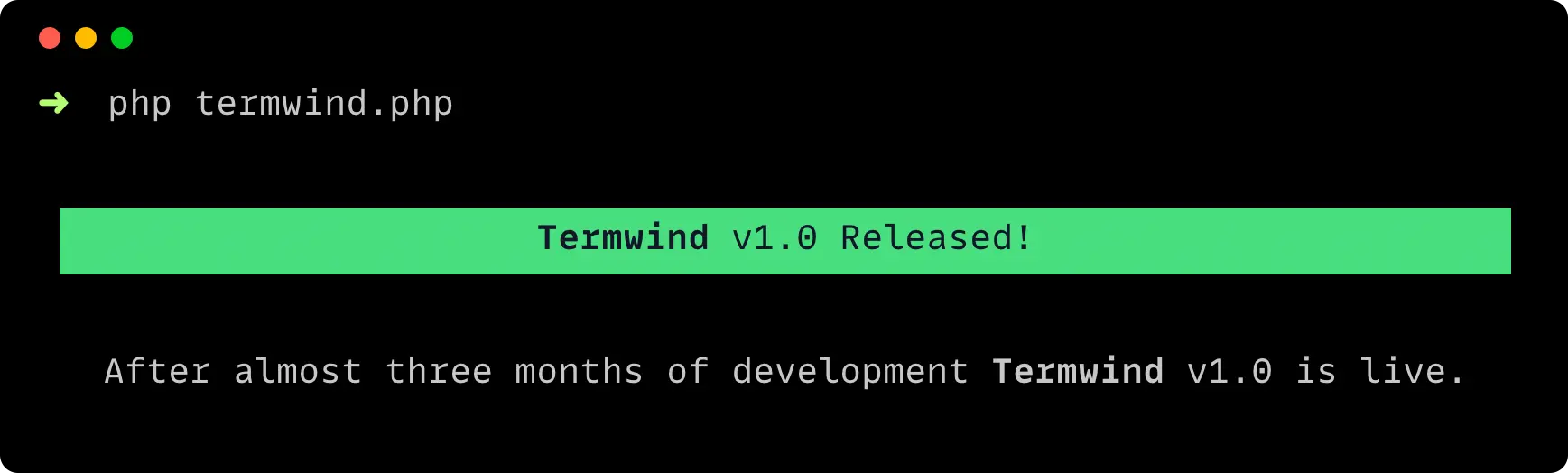
&lt;p&gt;&lt;strong&gt;This example&lt;/strong&gt; shows how easy it is to create a beautiful CLI output, with simple knowledge of &lt;strong&gt;HTML&lt;/strong&gt; and &lt;strong&gt;TailwindCSS&lt;/strong&gt;.&lt;/p&gt;
&lt;p&gt;&lt;img src="https://franciscomadeira.com/images/termwind-released.webp" alt="Termwind Released!" /&gt;&lt;/p&gt;
&lt;pre&gt;&lt;code class="language-php"&gt;use function Termwind/render;

render(&lt;&lt;&lt;HTML
    &lt;div class="m-1"&gt;
        &lt;div class="w-full text-center bg-green-400 text-black"&gt;
            &lt;b&gt;Termwind&lt;/b&gt; v1.0 Released!
        &lt;/div&gt;
        &lt;p class="w-full text-center"&gt;
            After almost three months of development &lt;b&gt;Termwind&lt;/b&gt; v1.0 is live.
        &lt;/p&gt;
    &lt;/div&gt;
HTML);
&lt;/code&gt;&lt;/pre&gt;
&lt;h2&gt;Now, lets create an output just like &lt;strong&gt;PEST&lt;/strong&gt;&lt;/h2&gt;
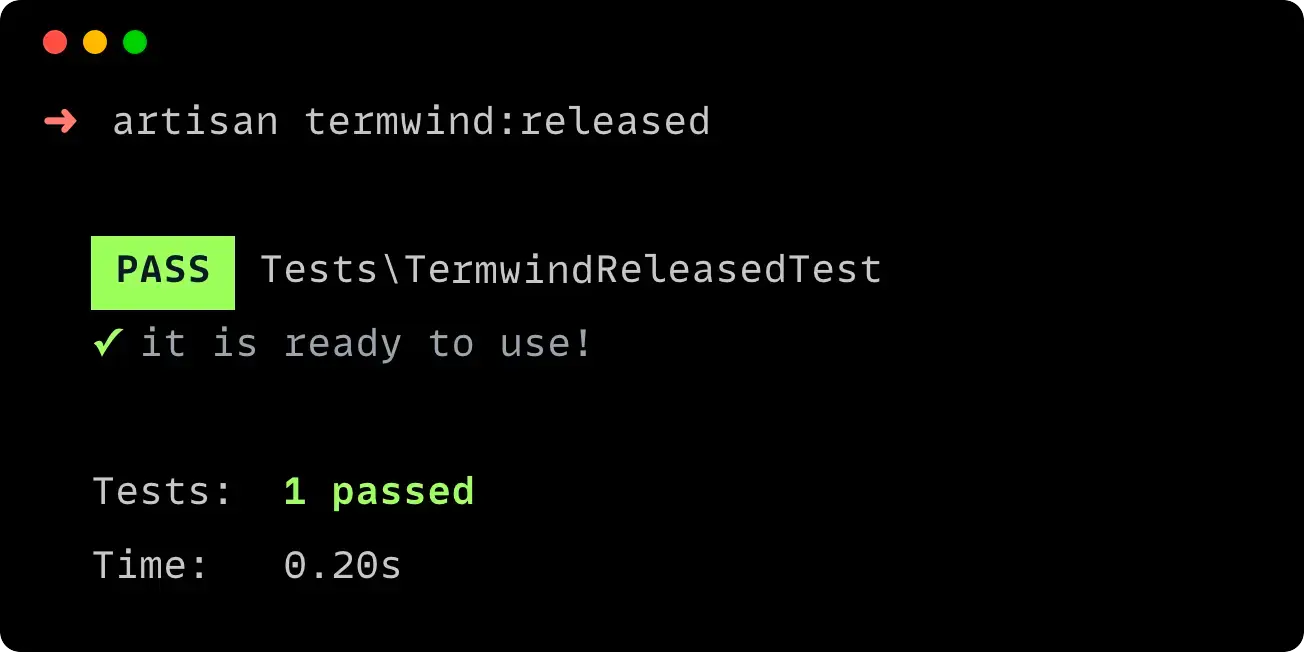
&lt;p&gt;For this example we will take advantage of the &lt;strong&gt;Laravel Framework&lt;/strong&gt; &lt;code&gt;Command&lt;/code&gt; with a &lt;code&gt;blade&lt;/code&gt; view.&lt;/p&gt;
&lt;p&gt;&lt;img src="https://franciscomadeira.com/images/pest-example.webp" alt="PEST Example" /&gt;&lt;/p&gt;
&lt;pre&gt;&lt;code class="language-php"&gt;&lt;?php

namespace App\Console\Commands;

use Illuminate\Console\Command;
use function Termwind\render;

class TermwindReleasedCommand extends Command
{
    protected $signature = 'termwind:released';

    public function handle()
    {
        return render(view('termwind', [
            'files' =&gt; [[
                'name' =&gt; 'Tests\TermwindReleasedTest',
                'tests' =&gt; [[
                    'name' =&gt; 'it is ready to use!',
                ]],
            ]],
            'totalTests' =&gt; 1,
            'totalTime' =&gt; '0.20s',
        ]));
    }
}
&lt;/code&gt;&lt;/pre&gt;
&lt;pre&gt;&lt;code class="language-php"&gt;&lt;div class="mx-2 my-1"&gt;
    @foreach ($files as $file)
        &lt;div&gt;
            &lt;span class="px-1 font-bold bg-green text-black"&gt;PASS&lt;/span&gt;
            {{ $file['name'] }}
        &lt;/div&gt;
        @foreach ($file['tests'] as $test)
            &lt;div class="text-gray-400"&gt;
                &lt;b class="text-green"&gt;✓&lt;/b&gt; {{ $test['name'] }}
            &lt;/div&gt;
        @endforeach
    @endforeach

    &lt;div class="mt-1"&gt;
        &lt;span class="w-8"&gt;Tests:&lt;/span&gt;
        &lt;b class="text-green"&gt;{{ $totalTests }} passed&lt;/b&gt;
    &lt;/div&gt;

    &lt;div&gt;
        &lt;span class="w-8"&gt;Time:&lt;/span&gt;
        &lt;span&gt;{{ $totalTime }}&lt;/span&gt;
    &lt;/div&gt;
&lt;/div&gt;
&lt;/code&gt;&lt;/pre&gt;
&lt;p&gt;&lt;strong&gt;What's next?&lt;/strong&gt; As v1.0 is ready to use on production. The future develoments we will focus on improving our documentation and provide a lot more use case examples.&lt;/p&gt;
&lt;p&gt;&lt;strong&gt;Get involved!&lt;/strong&gt; This is a community project and we are always looking for people to &lt;a href="https://github.com/nunomaduro/termwind"&gt;contribute&lt;/a&gt;.&lt;/p&gt;
&lt;ul&gt;
&lt;li&gt;You can learn more about, on &lt;a href="https://github.com/nunomaduro/termwind"&gt;GitHub&lt;/a&gt;.&lt;/li&gt;
&lt;li&gt;Follow us on Twitter: &lt;a href="https://twitter.com/enunomaduro"&gt;@enunomaduro&lt;/a&gt;, &lt;a href="https://twitter.com/xiCO2k"&gt;@xiCO2k&lt;/a&gt;.&lt;/li&gt;
&lt;/ul&gt;
&lt;blockquote&gt;
&lt;p&gt;As a joke I added to my Twitter Description "I built everything with HTML and CSS" and all of a sudden I start working on Termwind and the API is based around HTML and CSS classes. 😎&lt;/p&gt;
&lt;/blockquote&gt;
<![CDATA[<p><img src="https://franciscomadeira.com/images/termwind-released-hero.webp" alt="Termwind Released!" /> </p>
<p>Termwind allows you to build unique and beautiful PHP command-line applications, using the Tailwind CSS API with an HTML Renderer. In short, it's like Tailwind CSS, but for the PHP command-line applications.</p>
<p>Termwind was created by <a href="https://twitter.com/xiCO2k">Francisco Madeira</a> and <a href="https://twitter.com/enunomaduro">Nuno Maduro</a>, and after almost three months of development <strong>Termwind v1.0 is available</strong>, and you can start using on your projects.</p>
<p>Checkout the repository on <a href="https://github.com/nunomaduro/termwind">GitHub</a>!</p>
<h2>Why?</h2>
<p>One of many things that annoyed all the CLI developers was to add some margin before the content, just to have some breathing room, without <strong>Termwind</strong> the only way was to add spaces before each line, now with <strong>Termwind</strong> you can just pass the class <code>ml-2</code> and you will have <strong>two spaces</strong> on every line for that element, just like how we do for the browser.</p>
<p><strong>This example</strong> shows how easy it is to create a beautiful CLI output, with simple knowledge of <strong>HTML</strong> and <strong>TailwindCSS</strong>.</p>
<p><img src="https://franciscomadeira.com/images/termwind-released.webp" alt="Termwind Released!" /></p>
<pre><code class="language-php">use function Termwind/render;

render(&lt;&lt;&lt;HTML
    &lt;div class=&quot;m-1&quot;&gt;
        &lt;div class=&quot;w-full text-center bg-green-400 text-black&quot;&gt;
            &lt;b&gt;Termwind&lt;/b&gt; v1.0 Released!
        &lt;/div&gt;
        &lt;p class=&quot;w-full text-center&quot;&gt;
            After almost three months of development &lt;b&gt;Termwind&lt;/b&gt; v1.0 is live.
        &lt;/p&gt;
    &lt;/div&gt;
HTML);
</code></pre>
<h2>Now, lets create an output just like <strong>PEST</strong></h2>
<p>For this example we will take advantage of the <strong>Laravel Framework</strong> <code>Command</code> with a <code>blade</code> view.</p>
<p><img src="https://franciscomadeira.com/images/pest-example.webp" alt="PEST Example" /></p>
<pre><code class="language-php">&lt;?php

namespace App\Console\Commands;

use Illuminate\Console\Command;
use function Termwind\render;

class TermwindReleasedCommand extends Command
{
    protected $signature = 'termwind:released';

    public function handle()
    {
        return render(view('termwind', [
            'files' =&gt; [[
                'name' =&gt; 'Tests\TermwindReleasedTest',
                'tests' =&gt; [[
                    'name' =&gt; 'it is ready to use!',
                ]],
            ]],
            'totalTests' =&gt; 1,
            'totalTime' =&gt; '0.20s',
        ]));
    }
}
</code></pre>
<pre><code class="language-php">&lt;div class=&quot;mx-2 my-1&quot;&gt;
    @foreach ($files as $file)
        &lt;div&gt;
            &lt;span class=&quot;px-1 font-bold bg-green text-black&quot;&gt;PASS&lt;/span&gt;
            {{ $file['name'] }}
        &lt;/div&gt;
        @foreach ($file['tests'] as $test)
            &lt;div class=&quot;text-gray-400&quot;&gt;
                &lt;b class=&quot;text-green&quot;&gt;✓&lt;/b&gt; {{ $test['name'] }}
            &lt;/div&gt;
        @endforeach
    @endforeach

    &lt;div class=&quot;mt-1&quot;&gt;
        &lt;span class=&quot;w-8&quot;&gt;Tests:&lt;/span&gt;
        &lt;b class=&quot;text-green&quot;&gt;{{ $totalTests }} passed&lt;/b&gt;
    &lt;/div&gt;

    &lt;div&gt;
        &lt;span class=&quot;w-8&quot;&gt;Time:&lt;/span&gt;
        &lt;span&gt;{{ $totalTime }}&lt;/span&gt;
    &lt;/div&gt;
&lt;/div&gt;
</code></pre>
<p><strong>What's next?</strong> As v1.0 is ready to use on production. The future develoments we will focus on improving our documentation and provide a lot more use case examples.</p>
<p><strong>Get involved!</strong> This is a community project and we are always looking for people to <a href="https://github.com/nunomaduro/termwind">contribute</a>.</p>
<ul>
<li>You can learn more about, on <a href="https://github.com/nunomaduro/termwind">GitHub</a>.</li>
<li>Follow us on Twitter: <a href="https://twitter.com/enunomaduro">@enunomaduro</a>, <a href="https://twitter.com/xiCO2k">@xiCO2k</a>.</li>
</ul>
<blockquote>
<p>As a joke I added to my Twitter Description &quot;I built everything with HTML and CSS&quot; and all of a sudden I start working on Termwind and the API is based around HTML and CSS classes. 😎</p>
</blockquote>
]]></content><title>🍃 Termwind v1.0 Released!</title><summary>Termwind allows you to build unique and beautiful PHP command-line applications, using the Tailwind CSS API with an HTML Renderer. In short, it's like Tailwind CSS, but for the PHP command-line applications.</summary><updated>2021-12-06T10:02:42+00:00</updated><id>https://franciscomadeira.com/termwind-released</id></entry></feed>